The Tomorrow Lab’s Derek Johnson writes one of the smartest pieces I’ve read on why sudden interruptions (or last minute, poorly planned meetings) can wreck such havoc on a developer’s workflow:
Developers don’t wear headphones because we enjoy music more than anyone else, it’s because headphones shut everything out and give us the mental space we need to build a very complicated model…
…If you’re an interrupter and you get a terser response than you might have expected please don’t take it personally. We’re just aware of the model starting to loosen at the more precarious points and are getting frantic about the need to get back at work.
The smart slate of this post by Nicolas Bevacqua is how many different ways – YSlow, Webpagetest, Google PageSpeed – he tackles the same common problem: how do we automate our web performance measurements? Nicolas provides Gulp and Grunt plugins along with command line tools. The point here is simplification. Just start automating baseline performance in any way possible, as soon as possible. You’ll see a noticeable benefit for your web projects going forward.
Over four years and across eight issues we interviewed 64 world-renowned designers1, including; Erik Spiekermann, Jessica Hische, Michael Bierut, Nina Stössinger, Mark Simonson & Seb Lester, plus owners of respected type foundries such as, Font Smith, Type Together and Process Type.
We’ve counted the number of times each typeface was selected and found consensus with the top 25.
From a certain point of view, to borrow a phrase from a different movie, Star Wars isn’t an attempt to escape from Vietnam, but an attempt to recontextualize it, with the United States slotted into the role of the Empire, and the Rebellion standing in for the NVA and the Viet Cong. By the time the film reached screens, this source of inspiration was so deep in the mix—buried beneath everything from Joseph Campbell to Bruno Bettelheim to The Wizard Of Oz—that it hardly counted as subtext anymore. But it’s still fundamentally a story about revolutionaries standing up for what’s right, and its Vietnam-inspired origins complicate the notion that Star Wars was ever purely an escapist enterprise. No matter how long ago and how far, far away you set a story, the real world has a way of creeping in.
Of all the many influences on George Lucas for Star Wars, Vietnam wasn’t one that came to mind before reading Keith’s piece. Yet he makes a fairly persuasive argument.
I’ve linked to many RWD articles here, but this recent piece by Eric Portis in A List Apart is much more than another well written introduction to the subject. His logic and discussion around the new sizes attribute, an otherwise often confusing topic, is masterful.
The next time you’re in a discussion about typography, for a design or other context, have this handy resource by FontShop handy. It’s a nice refresher on a lot of basic terminology, from ascenders to x-height.
Front end developer Mina Markham wrote a very nifty starter kit for new Sass projects. On some of my latest work I’ve been especially influenced by Mina’s use of a utilities folder – it’s an effective way to include self-generated functions, mixins, and other external sass libraries all in one shot.
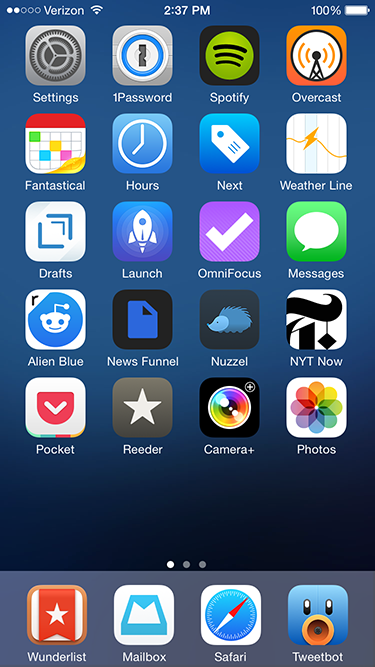
My iPhone app usage aligns with the 80-20 rule. Most apps I try are completely disposable; within a few days I delete them or relegate them to a folder off the home screen, for use only on rare occasions. Yet I use a handful of apps every day. They stand the test of time for months, if not years, of usage. As we wrap up 2014, I wanted to highlight my “must-haves”. Many are well known within tech circles, but there’s a few lesser known apps that are also worth your time.
News and Social media
Alien Blue. My Reddit usage pales in comparison to other social media and news sources. I never comment, happy to scan a handful of design and gaming subreddits for links and general information. Thankfully, Alien Blue handles the browsing component well. It deserves special praise for its handling of image galleries and videos, both of which pop up frequently on Reddit threads.
News Funnel. Another plug for my self-built news site that lists top stories from Designer News and Hacker News. It sizes down effectively for the iPhone (and other mobile devices) so I can scan both sites easily.
Nuzzel. The app aggregates and lists the most linked to articles in your Twitter feed, ordered by popularity. There’s no faster way to see what’s trending among my Twitter friends. And via the “news from friends of friends” option, I usually discover some tech, film or gaming related articles I would have otherwise missed. I’ve tried many tools that build content off of my Twitter feed; none of have stuck the way Nuzzel has.
NYT Now. I was I was skeptical of the streamlined, simplified interface of NYT Now when it debuted earlier this year. Yet after a week of usage it secured a permanent slot on my phone’s home screen. At its core, NYT Now lists the full NYT app’s top stories, but adds larger imagery and helpful bullet point summaries for articles I don’t have time to read. It’s that smart use of bullet points that make all the difference on the go.
Reeder. I like having full control over my news aggregation, so for me there’s no substitute for RSS in the form of a Feedbin account. On the go, Reeder is my Feedbin reader of choice. There are other quality apps with Feedbin integration, but I find Reeder syncs faster than the competition. Also, the screen density of list items – dense but not too dense – matches my workflow. It’s about speed and sharing to other services like Pocket and Twitter, not lingering to read full stories.
Tweetbot. I check up on Twitter frequently, which makes a strong Twitter client essential. And while there’s been strong improvements on the official Twitter app lately, it still can’t match the speed and customization Tweetbot offers. Its timeline sync between devices is an especially nice touch.
Productivity
Hours. I like to keep track of how much I’m working on both my day job and side tasks. I first tried popular web based time tracking software like Harvest and Toggl. But both felt optimized around more complex, team based workflows, when I prefer a simpler system. Enter Hours. The app centers on an intuitive interface for me to start, stop, and switch timers easily. It could use a Dropbox or iCloud based backup, not to mention a more customizable export system. But those are small quibbles on an otherwise strong 1.0 product.
Mailbox. I generally shy away from email apps that try to add their own productivity features on top of my inbox. But Mailbox adds its extras elegantly; with swipe gestures to archive or delete messages, I’m able to move through my inbox much faster than previous mail clients (there’s no coincidence Apple added similar swipe functionality to Mail with iOS8.) Overall, Mailbox adds just enough functionality to add value, but not too much to distract from my inbox content.
Pocket. My one stop source for catching up on content I’ve saved elsewhere on the web and aforementioned news apps like Tweetbot and Reeder. Parsing has gotten better over the years and the clean, stripped down reader view is easier on the eyes than many original web sources.
Wunderlist. I dig Omnifocus as a task manager for complex work tasks, but it’s overkill for simple to-do lists I write for chores, tasks at home, and other miscellaneous work. I’ve previously bounced around and tried Clear and Todoist, but both ultimately lacked staying power. Clear has a cool minimalist interface driven by gestures, but it was too simplistic for my needs and I’d run into occasional iCloud sync delays between devices. Todoist provides a lot more power, but the additional filters and searches overlapped too much with Omnifocus. Wunderlist finds a middle ground between Clear and Todoist; its sync is rock solid and the shared lists are useful and easy to set up with family members.
Miscellany
Next. Like with aforementioned time tracking, my budgeting needs are simple, centered on daily spending for expenses like restaurants, drinks, apps, and electronics. Because I’m entering in new entries manually each day, a smart entry UI is critical, and Next nails this perfectly. I tap a large category button, enter the amount and I’m done.
Overcast. For years I used Instacast to listen to podcasts. But eventually the complexity of extra features I never used (e.g. sleep timers, individual podcast settings), combined with several periods of slow syncing let me to try other clients. Marco Arment’s new Overcast matches my podcast flow perfectly; its interface is stripped down and straightforward, syncing is extremely reliable, and I use both of the exclusive “smart speed” and “voice boost” features heavily. There’s also a few small design touches I appreciate, like the audio equalizer animation during playback and the use of Concourse for typography.
Rise. I first scoffed at the idea of a dedicated alarm clock given the utility of Apple’s Clock app. But Rise is beautiful and has custom alarms that can progressively rise in volume, which I find is a more relaxing, peaceful way to be woken up. Most importantly, its gesture interface makes setup very easy, an important consideration given how often I change my wakeup time slightly from day to day.
RunKeeper. I run several times a week, and while I like select features on Strava and other fitness apps, I’ve always come back to RunKeeper for GPS-based run logging. The app has a straightforward interface that’s easy to both interact with and read as you run. I also appreciate the high degree of customization for automated voice notifications on your distance, time and speed.
Weather Line. I feel like I’ve tried at least twenty weather apps over the years, but since I started using Weather Line a year ago, I’ve been hooked. Like a few other weather apps, it has Dark Sky integration, which I find essential (so much so I own the original Dark Sky app for extra detail during rainy weather.) But Weather Line has a unique line graph interface that’s easily scannable to see how the rest of the day or week will pan out. I haven’t found another app that’s quite as intuitive, especially for a quick glance.
It’s that time of year again; several critically acclaimed apps get a discount for the holidays. Many rarely get a discount, so it’s worth jumping on these sales before they end on December 26th.
It’s a extremely strong set of applications, but I’d personally recommend Tweetbot, Drafts 4, Scanner Pro, MindNode, Next, and Clear.
Another meticulously detailed Typeset In the Future post, this time about the use of Futura, Helvetica, and many other fonts in Ridley Scott’s Alien. The movie is a masterpiece of horror, sci-fi, and suspense, one of my favorite movies of all time. So it’s wonderful to see author Dave Addey geek out in such depth on small typographic cues contained all over the picture. It’s complemented with lots of freeze frames and behind the scenes knowledge.